venerdì 13 dicembre 2013

OpenStack in a BOX

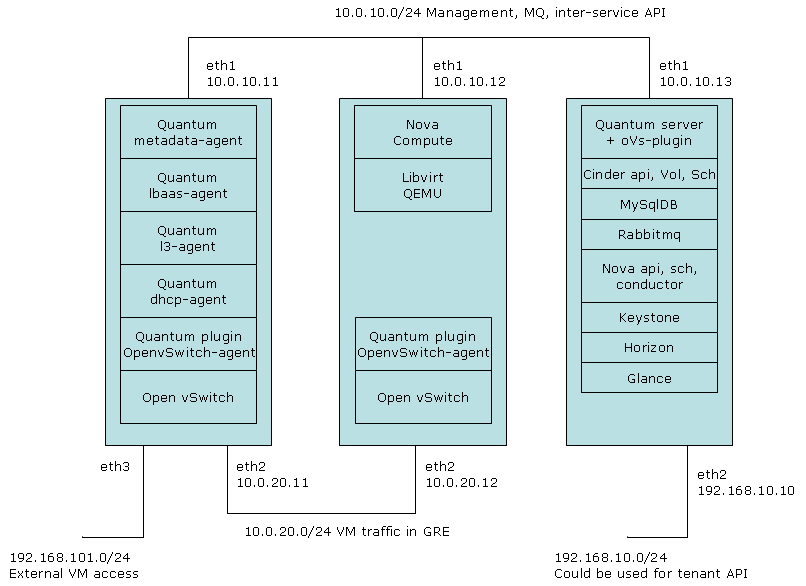
Come installare OpenStack sul proprio desktop per sperimentare con il prodotto in una configurazione interessante, con tre Nodi: Controller Compute e Network.
Per fare ciò utilizzeremo a sua volta delle macchine virtuali create tramite Virtualbox (https://www.virtualbox.org/) per i tre Nodi, ed un PC desktop con almeno 4Gb di RAM. Per generare le macchine virtuali utilizzeremo Vagrant ed Ansible. Ansible è un sw per la gestione di infrastrutture e sarà utilizzato per deployare sui tre nodi virtuali (Vbox) di OpenStack tutto il sw necessario.
Per qualche dettaglio su Ansible si può consultare:http://www.slideshare.net/fcollova/infrastructure-as-data. Vagrant e un tool per la creazione e gestione delle macchine Virtuali di Virtualbox.
La versione di OpenStack che installeremo è Havana cioè l'ultima disponibile al sito di OpenStack (http://www.openstack.org/).
Per fare l'installazione utilizziamo un Kit fatto da Djorelly che ringrazio per il suo lavoro, è disponibile qui: https://github.com/djoreilly/quantum-ansible.I prerequisiti sono di aver installato su una distribuzione Ubuntu 12.04 LTS (questa è quella che ho utilizzato) i seguenti SW:
  • git
    $ sudo pip install paramiko PyYAML Jinja2 ansible
  • VirtualBox (versione usata 4.2.18)
Per installare tutto l'ambiente basta fare:
(Prelevate la 64-bit Ubuntu 12.04 (precise) Vagrant box)

vagrant box add precise64 http://files.vagrantup.com/precise64.box

git clone http://github.com/djoreilly/quantum-ansible
cd quantum-ansible
git checkout havana
./install-openstack

Alla fine dell'installazione che dura circa 30mm vi potrete collegare al vostro openstack dal desktop tramite la console Horizon che sarà raggiungibile all'indirizzo: http://10.0.10.10/horizon utente=admin and password=secrete.


I tre nodi saranno generati secondo al configurazione che vedete nella figura seguente:


martedì 12 marzo 2013

venerdì 31 agosto 2012


    - NetworkX - is a Python library for doing network analysis it allow to create and study
complex network and is based completely on Python without module compiled
in other language

NetworkX is able to manage many type of networks, or graphs:

• Nodes can be any (hashable) Python object, edges can contain arbitrary data
• Flexibility ideal for representing networks found in many different fields
• Easy to install on multiple platforms and up-to-date documentation
• First release in April 2005

The official site is: http://networkx.lanl.gov/


venerdì 27 gennaio 2012

MIT Social TV project NeXtream

MIT NeXtream project leverages existing social networks and content sources to retrieve and determine content to show to each user.


Mobile Device Social Network Screens

NeXtream allows users to interact with their social network while watching video clips on a separate device (e.g., Television), with contextual relevance.

Server and Device Architecture


Source: MIT NeXtream project

martedì 17 gennaio 2012

Boosting VDSL2 Bit Rates with Vectoring


In late September, at the Broadband World Forum, in Paris, Alcatel-Lucent announced that it is starting commercial rollout of an enhanced version of a very high-speed DSL technology, called VDSL2, with vectoring. Vectoring is a technique that reduces copper-wire interference simultaneously for multiple customers in order to push broadband speeds over 100 Mbps. While running fiber all the way to the home can produce speeds of several hundred megabits per second, VDSL2 vectoring can use legacy telephone access networks.

Boosting VDSL2 Bit Rates with Vectoring